If you are looking to create your own fonts, here are the best 3 software to build your own font in Windows and macOS.
I personally tried all these 3 programs and I will tell you on short for each one the pros and the cons so you can quickly pick the right software for you.
Why create your own font when there are hundreds of thousands of available fonts?This is a good question, there are lots of good fonts out there, both free and paid.
So why spend time creating your own font?
It is simple, because you want your brand to be unique.
And to obtain that, a cool crafted font will help you big time.
Is it hard to create a font?It was hard to create fonts but many years ago.
Now, if you use the right tools (any of the tools that I will soon present), you can build your very own font quickly and without needing to have any design or font skills.
This is the beauty of creating fonts in 2023, it is easy and affordable, and anyone can do it with very little effort.
So, let’s see the program that you can use to create your own fonts.
The best 3 software to build your own font in Windows and macOSThese 3 programs are highly popular among people that love to create their own fonts.
The order in which I present you these solutions have nothing to do with how great they are.
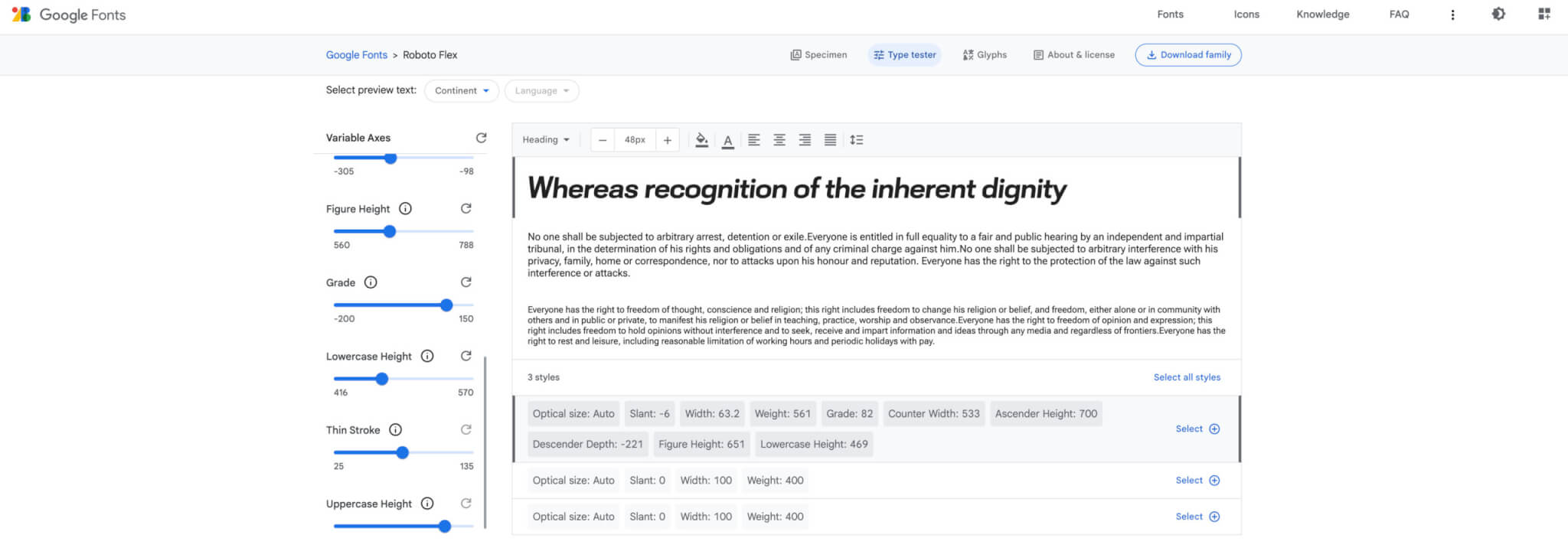
1. Google Roboto FlexGoogle Roboto Flex is a free font created by Google that you can use to heavily customize Roboto font.
With Roboto Flex you can create any font you want but based on Roboto font.
It is a Roboto font customization software.
Plenty of people, including me, had superb results with Google Roboto Flex.
Pros:
– The font builder is free to use, and has a copyright free policy.
– Use it right away for your brand, business, blog, magazine, etc.
– Highly simple to use font builder.
– Free to use.
Cons:
– You can create a new font that is just a variation of Roboto, not entirely a new font.
2. BirdfontBirdfont is one of the favorite font builders for people from all over the world.
Using this font builder, you can actually create fonts that can compete with the very best font designs in the world.
Yes, this font builder is extremely capable.
Pros:
– Free to use for personal projects.
– Just $4.99 for the version you need for commercial projects.
– The software works for all major platforms – Windows, MAC, and Linux.
– Plenty of tutorials.
Cons:
– Quite complex for a total beginner.
3. FontArkFontArk is a brilliant browser-based font creator and editor that lets you create fonts in real-time.
Have in mind that Fontark is in advanced Open Beta version and while it is stable and workable, this is not the final versions and you might get errors.
So, save everything you do to be sure that your work is not lost.
Pros:
– Free to use.
– One-click font generation and download.
– Easy to run in the browser.
– Plenty of tutorials.
Cons:
– Open Beta version.
– There is a learning curve to use this software.
ConclusionsCreating your own fonts is nice, quite easy depending on the software you will use, free or super affordable, and it will help you big time with your brand.
Unique fonts for each brand are the future and most companies, small and large, are already doing it.
So join the future and create all by yourself a unique font.

I'm a programmer at heart. But in my 20s, I realized there was more to the world of fonts than just Courier.
Driven by endless curiosity, I built a system to explore them.
That project grew into one of the world’s leading font identifier platforms: www.WhatFontIs.com.
By 2024, WhatFontIs is helping nearly one million designers—famous or not—discover the names of the fonts they need.